
Download Cigati DWG Converter – Free DWG to PDF, JPEG, PNG, DOC & More
Cigati DWG Converter is a reliable and efficient software tool designed for professionals and casual users who frequently work with AutoCAD files. Whether you're in architecture, engineering, or design, this powerful converter allows you to transform DWG and DXF files into multiple formats like PDF, JPEG, PNG, BMP, TIFF, HTML, DOC, and GIF with ease. With batch conversion capabilities, it saves valuable time by processing multiple files simultaneously.
The user-friendly interface ensures that even beginners can navigate the tool effortlessly. Cigati DWG Converter also provides detailed file metadata after conversion, offering insights into file size, dimensions, and layer information. This makes it ideal for quality checks and documentation purposes.
The software is compatible with Windows systems and supports both 32-bit and 64-bit operating systems. With secure file handling and regular updates, Cigati DWG Converter stands out as a must-have utility for anyone managing CAD files.
Effortless DWG to Multiple Formats Conversion
One of the standout features of Cigati DWG Converter is its ability to convert AutoCAD files into a wide range of output formats. Whether you need to share a design with a client who doesn’t have AutoCAD, generate printable PDFs, or embed drawings into reports, this tool delivers seamless results. The supported formats include industry-standard PDF, high-resolution JPEG and PNG images, archival TIFF, editable DOC files, web-friendly HTML, and even animated GIFs.
This versatility makes Cigati DWG Converter an indispensable tool for cross-platform collaboration. For example, architects can export their DWG layouts as PDFs for client presentations, while engineers can convert drawings into JPEGs for use in technical documentation. The conversion process is straightforward: simply drag and drop your DWG or DXF files into the interface, select your desired output format, and initiate the conversion.
The tool preserves layering, text clarity, and line precision, ensuring high-quality output. Moreover, the software supports batch processing, allowing users to convert dozens or even hundreds of files at once—perfect for large-scale projects or archival tasks. This feature alone significantly reduces manual effort and minimizes the risk of human error.
With real-time previews and customizable settings, users can fine-tune output quality, resolution, and color mode before finalizing conversions. The result is a professional-grade output that maintains the integrity of the original design.
Intuitive Interface & Advanced File Management
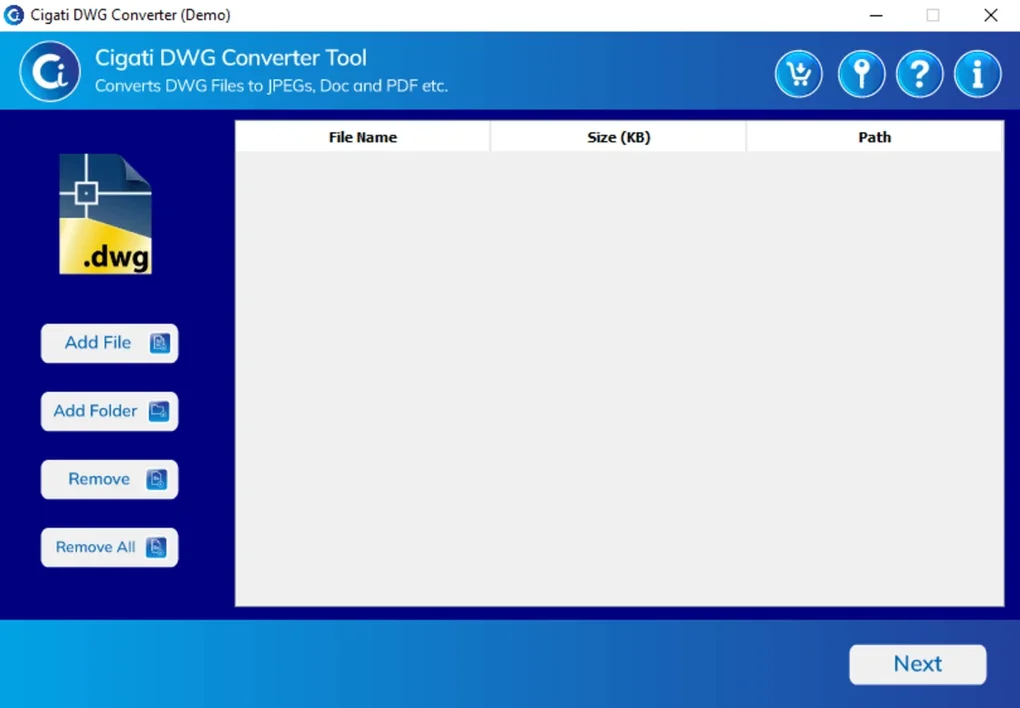
Designed with usability in mind, Cigati DWG Converter features an intuitive interface that simplifies the conversion workflow for users of all skill levels. The clean layout, clearly labeled buttons, and logical navigation make it easy to add files, select output formats, and manage conversion tasks without any learning curve. Even first-time users can quickly grasp how to use the tool, thanks to well-placed tooltips and a step-by-step guide accessible within the application.
Beyond basic conversion, the software offers advanced file management capabilities. After importing a DWG file, users can view detailed metadata such as file size, creation date, layer count, and object dimensions. This information is invaluable for quality control, version tracking, and documentation.
The tool also allows users to preview the drawing before conversion, ensuring that the output matches expectations. For power users, Cigati DWG Converter includes customizable settings for output resolution (up to 300 DPI), color mode (color, grayscale, or black & white), and page size. These options ensure that the converted files meet specific project requirements.
Additionally, the software supports both single and bulk file processing, giving users the flexibility to handle small tasks or large-scale conversions with equal ease. The interface remains responsive and stable, even when processing large files or multiple files simultaneously. With regular updates and a dedicated support team, Cigati DWG Converter continues to evolve, offering improved performance and new features.
Whether you're a student, freelancer, or enterprise user, this tool adapts to your workflow and enhances productivity.
Compatibility, Security & Reliable Performance
Cigati DWG Converter is optimized for Windows operating systems, supporting both 32-bit and 64-bit versions of Windows 7, 8, 10, and 11. This ensures broad compatibility with most desktop environments used in professional and educational settings. The software is lightweight and does not require high system resources, making it suitable for older machines as well.
Installation is quick and straightforward—users can download the free version from the official website, run the installer, and launch the app in minutes. No complex setup or additional dependencies are required. Security is a top priority, with the software using encrypted file handling to prevent data leaks during conversion.
All temporary files are automatically deleted after processing, ensuring no trace remains on the system. The tool also avoids intrusive ads or bundled software, providing a clean and trustworthy user experience. Regular updates are released to fix bugs, improve compatibility with new AutoCAD versions, and enhance performance.
These updates are delivered through an in-app notification system, so users stay up to date without hassle. For users who need more advanced features, a premium version is available with additional tools like password protection, watermarking, and custom templates. However, the free version already offers robust functionality that meets the needs of most users.
The software runs stably even during long conversion sessions, with minimal crashes or freezes. Overall, Cigati DWG Converter delivers consistent, reliable performance across various workloads, making it a dependable choice for daily use.
Pros & Cons: Is Cigati DWG Converter Right for You?
- Pros:
- Supports conversion to 10+ formats including PDF, JPEG, PNG, DOC, HTML, and GIF
- Batch conversion for efficient processing of multiple files
- Intuitive interface suitable for beginners and experts alike
- Displays detailed file metadata and preview before conversion
- Lightweight and fast, with minimal system resource usage
- Secure file handling with automatic cleanup of temp files
- Regular updates and stable performance
- Cons:
- Currently only available for Windows (no Mac, Android, or iOS support)
- Advanced features like watermarking and password protection require a paid upgrade
- No built-in file compression or optimization for output files
Frequently Asked Questions (FAQ)
Can I convert DWG files to PDF using Cigati DWG Converter?
Yes, Cigati DWG Converter fully supports converting DWG and DXF files to PDF. This is one of the most commonly used features, especially for sharing designs with clients or integrating drawings into reports. The tool preserves text, layers, and line quality, ensuring a professional-looking output.
Is Cigati DWG Converter free to download and use?
Yes, the core version of Cigati DWG Converter is completely free to download and use. It offers robust conversion capabilities without requiring a subscription. However, advanced features like watermarking, password protection, and custom templates are available in the premium version.
Does Cigati DWG Converter support batch conversion?
Absolutely. Cigati DWG Converter allows users to add multiple DWG or DXF files at once and convert them in bulk. This feature is ideal for large projects, archiving, or preparing files for sharing across teams.
Can I preview my DWG file before converting it?
Yes, the software includes a built-in preview window that displays the drawing before conversion. This allows you to verify the layout, scale, and content before processing, helping prevent errors.
Is Cigati DWG Converter safe to install on my computer?
Yes, Cigati DWG Converter is safe and secure. It does not contain malware, ads, or bundled software. All files are processed locally, and temporary files are automatically deleted after conversion to protect your privacy.
Conclusion: A Must-Have Tool for CAD File Management
If you frequently work with AutoCAD files and need to convert them into widely accessible formats, Cigati DWG Converter is an excellent choice. Its combination of powerful features, ease of use, and reliable performance makes it a standout tool in the CAD conversion space. Whether you're converting a single drawing to PDF for a client or processing hundreds of files for a project archive, this software handles the job efficiently and accurately.
The ability to view file details and preview content before conversion adds a layer of confidence and control. While it’s currently limited to Windows users and lacks some advanced features in the free version, the core functionality is more than sufficient for most users. With regular updates and strong security practices, Cigati DWG Converter continues to improve.
For anyone seeking a free, secure, and effective way to convert DWG files, this tool is a top recommendation. Download Cigati DWG Converter today and streamline your workflow with ease.







